

PsychoPy
Introduction
PsychoPy is an open-source, Python based software package used for creating behavioral experiments. It features and easy to use graphical user interface. PsychoPy can be used for online research in combination with Pavlovia.
General Information
Table below is clickable to enlarge, filter or sort.
Click here to see the master table.
Filters applied by default (Name=PsychoPy), to see the entire table, click on it and press reset.
Name | Internal | Description | Version | Type | Online | Support | Lab PCs | Analysis PCs | LIBC PCs | VR PCs | Status | License and Installation | System Owner | Functioneel Beheer | Technisch Beheer | Key User | Notes |
|---|---|---|---|---|---|---|---|---|---|---|---|---|---|---|---|---|---|
| AcqKnowledge | AcqKnowledge Admin | Software for recording and analyzing physiological signals (such as ECG). | 5.0.81 with NIBP100E license | App | No | Full | On Request | On Request | No | No | Active | Paid software. Installed only by SOLO. Can only be used with a license dongle, provided by SOLO. | Elio Sjak-Shie | RST (Iris Spruit) | ISSC | RST (Iris Spruit) | |
| AcqKnowledge | AcqKnowledge Admin | Software for recording and analyzing physiological signals (such as ECG). | 5.0.6 | App | No | Full | Yes | Yes | No | No | Active | Paid software. Installed by the ISSC. License dongle provided by SOLO for use on non-university devices. | Elio Sjak-Shie | RST (Iris Spruit) | ISSC | RST (Iris Spruit) | |
| AcqKnowledge | AcqKnowledge Admin | Software for recording and analyzing physiological signals (such as ECG). | 4.4 | App | No | Minimal | No | No | No | No | Limited | Paid software. Not available at ISSC anymore. License dongle provided by SOLO for use on non-university devices. | Elio Sjak-Shie | RST (Iris Spruit) | ISSC | RST (Iris Spruit) | |
| ActiView | ActiView Admin | Software for recording EEG data. | 9.0.2 | App | No | Full | Yes | No | No | On Request | Active | Free software. | Elio Sjak-Shie | RST/LST (Iris Spruit/Evert Dekker) | ISSC | RST/LST (Iris Spruit/Evert Dekker) | |
| Anaconda | - | Package and environment manager used for creating and using custom Python environments. | 2025.12 | App | No | Minimal | No | No | Yes | No | Limited | Free software. | ? | ? | ? | ? | Installed on the Windows 11 LIBC stimulus PC. |
| Anaconda | - | Package and environment manager used for creating and using custom Python environments. | 2022.10 | App | No | Full | Yes | Yes | No | On Request | Active | Free software. | Elio Sjak-Shie | RST (Elio Sjak-Shie) | ISSC | RST (Elio Sjak-Shie) | |
| ATLAS.ti | - | Software for analyzing qualitative data. | Latest available at ISSC | App | No | None | No | Yes | No | No | Active | Paid software. Installed by the ISSC. License provided by ISSC. | ? | ? | ISSC | ? | Version 25 is installed in 1B02. |
| ArborXR | - | ? | Service | No | Full | No | No | No | Yes | Active | |||||||
| Arduino IDE | - | 2.3.10 | App | No | None | No | No | Yes | No | Active | Free software. | ? | ? | ? | ? | Installed on the Windows 11 LIBC stimulus PC. | |
| BrainVision Analyzer | - | Software for analyzing EEG data. | Latest available at ISSC | App | No | Minimal | No | Yes | No | No | Active | Paid software. Installed by the ISSC. | ? | ? | ISSC | Henk van Steenbergen | Version 2.3.0 is installed in 1B02. |
| DEP-Tool | - | Platform for managing Ethics, Datamanagement and Privacy Form. | n.a. | Service | No | Full | N/A | N/A | N/A | N/A | Active | Owned by Leiden, support and development by Emerald IT | Arie in 't Veld | RST (Kerwin Olfers) | External | RST (Kerwin Olfers) | |
| E-Prime | E-Prime Admin | Software suite used for building and administering computer tasks. | 3.0.3.219 | App | No | Full | Yes | Yes | Yes | No | Active | Paid software. Installed by the ISSC. License via VPN or dongle provided by SOLO. | Elio Sjak-Shie | RST (Iris Spruit) | ISSC | RST (Iris Spruit) | Installed on the Windows 11 LIBC stimulus PC. |
| E-prime | E-Prime Admin | Software suite used for building and administering computer tasks. | 3.0.3.80 | App | No | Minimal | No | No | Yes | No | Limited | Paid software. Not available at ISSC anymore. License via VPN or dongle provided by SOLO. | ? | ? | ? | ? | Installed on the Win 7 LIBC PC and interview PC in 3053K. |
| E-Prime | E-Prime Admin | Software suite used for building and administering computer tasks. | 2.0.10.356 | App | No | Minimal | On Request | On Request | Yes | No | Active | Paid software. Installed by the ISSC. License via dongle provided by SOLO. | Elio Sjak-Shie | RST (Iris Spruit) | ISSC | RST (Iris Spruit) | Installed on the Win 7 LIBC PC. |
| E-Prime Extensions for EyeLink (EEE) | - | E-Prime extension required for EyeLInk eye tracking in E-Prime | 3.0.1.130 | App | No | Full | On Request | On Request | On Request | No | Active | Paid software. Not packaged, installed by SOLO. | Elio Sjak-Shie | RST (Iris Spruit) | RST (Iris Spruit) | ||
| E-Prime Extensions for Tobii Pro (EET) | - | E-Prime extension required for Tobii eye tracking in E-Prime. | 3.2.1.105 | App | No | Full | Yes | Yes | No | No | Active | Paid software. Installed by the ISSC. EET is not part of the E-Prime installation and needs to be installed separately. | Elio Sjak-Shie | RST (Iris Spruit) | ISSC | RST (Iris Spruit) | |
| ELAN | ELAN Admin | Software for analyzing behavioral (video) data. | 6.8 | App | No | Full | No | Yes | No | No | Active | Free. Installed by the ISSC or zip downloaded by user. | Elio Sjak-Shie | RST (Iris Spruit) | ISSC | RST (Iris Spruit) | |
| EyeLink DataViewer | - | Software for analyzing EyeLink data | 5.2.1.0 | App | No | None | No | On Request | No | No | Active | Can only be used with a license dongle, provided by SOLO. | |||||
| EyeLink Developers Kit | - | Required for communicating with an EyeLink eye tracker from the Stimulus PC and for using Track.exe. | 2.2.596.0 | App | No | Minimal | On Request | No | Yes | No | Active | Free. Packaged and installed by the ISSC. Needs additional manual creation of sdemo folder on LabProefpersoon Desktop by labsupport via ABR, see Weetjes. | Elio Sjak-Shie | RST (Iris Spruit) | n.a. | RST (Iris Spruit) | Installed on the Windows 11 LIBC stimulus PC. |
| Git | - | Command-line tool for version control. | Latest available at ISSC | App | No | None | Yes | Yes | Yes | Yes | Active | Free | Version 2.54 is installed on the lab PC's, in 1B02 and on the Windows 11 LIBC stimulus PC. | ||||
| GitHub Desktop | - | GUI tool for version control. | Latest | App | No | Full | No | No | No | Yes | Active | Free | |||||
| Gorilla | Gorilla Admin | Online service used for building and hosting online tasks. | ? | Service | Yes | Minimal | N/A | N/A | N/A | N/A | Active | Paid license for FSW, FGW students & staff | Elio Sjak-Shie | RST (Kerwin Olfers) | External | RST (Kerwin Olfers) | |
| Inquisit | - | Software for building and administering computer tasks. | 5.0 | App | No | None | No | No | Yes | No | Limited | License required. SOLO does not have any licenses. | Installed on the Win 7 LIBC PC. | ||||
| Insta360 Studio | - | Edit spherical (180-360*) videos | Latest | App | No | Minimal | No | No | No | Yes | Active | Free. Installation requires camera serial number for verification. | |||||
| JATOS | JATOS Admin | Online service used for hosting online tasks. | 3.9.7 | Service | Yes | Full | N/A | N/A | N/A | N/A | Active | Self-hosted, free for Leiden students & staff | Elio Sjak-Shie | RST (Kerwin Olfers) | ISSC | RST (Kerwin Olfers) | |
| JetBrains Rider | - | IDE for C# development. Works well with Unity. | Latest | App | No | Full | No | No | No | Yes | Active | Free educational license through GitHub Education. | |||||
| MATLAB | - | Programming and computing software. | 2025b | App | No | Full | On Request | Yes | No | No | Active | Paid software. Installed by the ISSC. Licence provided by the ISSC or via Mathworks.com. | Elio Sjak-Shie | RST (Elio Sjak-Shie) | ISSC | RST (Elio Sjak-Shie) | |
| MATLAB | - | Programming and computing software. | 2024b | App | No | Full | On Request | No | Yes | No | Active | Paid software. Installed by the ISSC. Licence provided by the ISSC or via Mathworks.com. | Elio Sjak-Shie | RST (Elio Sjak-Shie) | ISSC | RST (Elio Sjak-Shie) | Installed on the Windows 11 LIBC PC with LUMC license. |
| MATLAB | - | Programming and computing software. | 2021b | App | No | Minimal | No | No | Yes | No | Limited | Paid software. Campus license via Mathworks.com. | ? | ? | ? | ? | Installed on LIBC interview PC in 3053K. |
| MATLAB | - | Programming and computing software. | 2012B | App | No | None | No | No | No | No | Archived | Paid software. Campus license via Mathworks.com. | ? | ? | ? | ? | |
| MATLAB Runtime | - | Required for running MATLAB applications (such as the PhysioData Toolbox). | R2023b | App | No | Minimal | No | Yes | No | No | Active | Free. Installed by the ISSC on managed PCs. Required for PhysioData Toolbox v0.7.0 | Elio Sjak-Shie | RST (Elio Sjak-Shie) | ISSC | RST (Elio Sjak-Shie) | |
| MATLAB Runtime | - | Required for running MATLAB applications (such as the PhysioData Toolbox). | R2022b | App | No | Minimal | No | On Request | No | No | Active | Free. Installed by the ISSC on managed PCs. | Elio Sjak-Shie | RST (Elio Sjak-Shie) | ISSC | RST (Elio Sjak-Shie) | |
| MATLAB Runtime | - | Required for running MATLAB applications (such as the PhysioData Toolbox). | R2020b (v9.9) | App | No | Minimal | No | On Request | No | No | Active | Free. Installed by the ISSC on managed PCs. Required for PhysioData Toolbox v0.6.3. | Elio Sjak-Shie | RST (Elio Sjak-Shie) | ISSC | RST (Elio Sjak-Shie) | |
| MATLAB Runtime | - | Required for running MATLAB applications (such as the PhysioData Toolbox). | R2018b (v9.5) | App | No | Minimal | No | On Request | No | No | Active | Free. Installed by the ISSC on managed PCs. Required for legacy versions of the PhysioData Toolbox. | Elio Sjak-Shie | RST (Elio Sjak-Shie) | ISSC | RST (Elio Sjak-Shie) | |
| Meta Horizon Link | - | Cast directly from Quest HMD to PC. | Latest | App | No | Full | No | No | No | Yes | Active | Free | |||||
| Meta Quest Developer Hub | - | Developer tools for interacting with Quest HMDs. | Latest | App | No | Full | No | No | No | Yes | Active | Free | |||||
| Neuro BS Presentation | - | Software for building and administering computer tasks. | 25.1 | App | No | None | No | No | Yes | No | Limited | License managed by Mischa de Rover | ? | ? | ? | ? | Installed on the Windows 11 LIBC stimulus PC. |
| nirsLAB | - | Software for analyzing fNIRS data. | 2019.04 | App | No | None | On Request | On Request | No | No | Active | Free. Not packaged. | ? | ? | ? | ? | Installed on PC 0051818 in 1B02. |
| OpenSesame | OpenSesame Admin | Software for building and administering computer tasks. | 4.1.6 (python 3.10) | App | Yes | Full | On Request | Yes | Yes | No | Active | Free | Elio Sjak-Shie | RST (Iris Spruit) | ISSC | RST (Iris Spruit) | Installed on the Windows 11 LIBC stimulus PC. |
| OpenSesame | OpenSesame Admin | Software for building and administering computer tasks. | 4.0.24 (python 3.11) | App | Yes | Full | Yes | No | No | On Request | Active | Free | Elio Sjak-Shie | RST (Iris Spruit) | ISSC | RST (Iris Spruit) | |
| OpenSesame | OpenSesame Admin | Software for building and administering computer tasks. | 4.0.13 (python 3.11) | App | Yes | Minimal | No | No | Yes | No | Limited | Free | ? | ? | ? | ? | Installed on the Win 10 LIBC PC. |
| OpenSesame | Software for building and administering computer tasks. | 3.3.14 (python 3.7) | App | Yes | Full | No | No | No | No | Archived | Free | Elio Sjak-Shie | RST (Iris Spruit) | ISSC | RST (Iris Spruit) | ||
| OpenSesame | OpenSesame Admin | Software for building and administering computer tasks. | 3.3.12 (python 3.7) | App | No | Minimal | No | No | Yes | No | Limited | Free | ? | ? | ? | ? | Installed on LIBC interview PC in 3053K. |
| oTree | - | Python-based framework for creating interactive experiments. | ? | Service | Yes | None | No | No | No | No | Active | ? | ? | ? | Erik de Kwaadsteniet | ||
| Pavlovia | Pavlovia Admin | Web service for hosting online tasks. | ? | Service | Yes | Full | N/A | N/A | N/A | N/A | Active | Paid license for FSW/FGW students & staff | Elio Sjak-Shie | RST (Kerwin Olfers) | External | RST (Kerwin Olfers) | |
| PhysioData Toolbox | - | Software for analyzing physiological data (such as ECG). | 0.7.0 | App | No | Full | No | Runnable | No | On Request | Active | Free. A MATLAB Component Runtime is required to run. | Elio Sjak-Shie | Elio Sjak-Shie | Elio Sjak-Shie | Elio Sjak-Shie | |
| PsychoPy | - | Software for building and administering computer tasks. | 2024.2.5 (python 3.8) | App | Yes | Full | On Request | Yes | Yes | No | Active | Free. Packaged and installed by the ISSC. | Elio Sjak-Shie | RST (Elio Sjak-Shie) | ISSC | RST (Elio Sjak-Shie) | Installed on the Windows 11 LIBC stimulus PC. |
| PsychoPy | - | Software for building and administering computer tasks. | 2024.1.5 | App | Yes | Full | Yes | No | No | On Request | Active | Free | Elio Sjak-Shie | RST (Elio Sjak-Shie) | ISSC | RST (Elio Sjak-Shie) | |
| PsychoPy | - | Software for building and administering computer tasks. | 2023.2.3 | App | Yes | Minimal | No | No | Yes | No | Limited | Free | ? | ? | ? | ? | Installed on the Win 10 LIBC PC. |
| PsychoPy | - | Software for building and administering computer tasks. | 2022.2.4 | App | Yes | Full | No | No | Yes | No | Limited | Free | ? | ? | ? | ? | Installed on LIBC interview PC in 3053K. |
| PsychToolbox | PsychToolbox Admin | MATLAB Toolbox used for building and administering computer tasks. | 3 | App | No | Full | On Request | On Request | No | On Request | Active | Paid license required for versions 3.0.20 and later. Currently no license available. | Elio Sjak-Shie | RST (Elio Sjak-Shie) | ISSC | RST (Elio Sjak-Shie) | |
| Python | - | Programming and computing software. | 3.12 | App | No | Full | No | Yes | No | On Request | Active | Free. Packaged and installed by the ISSC. | ? | ? | ISSC | FSW: RST (Elio Sjak-Shie) | |
| Python | - | Programming and computing software. | 3.11 | App | No | Full | Yes | No | Yes | On Request | Active | Free | ? | ? | ISSC | FSW: RST (Elio Sjak-Shie) | Installed on the Windows 11 LIBC stimulus PC. |
| Qualtrics | - | Online service for building and administering questionnaires. | ? | Service | Yes | Full | N/A | N/A | N/A | N/A | Active | Paid license for all university staff and students. Login with ULCN. | Library | Library | External | FSW: RST (Kerwin Olfers) | |
| R* | - | Programming and computing software. | Latest available at ISSC | App | No | Minimal | No | Yes | No | On Request | Active | Free. Packaged and installed by the ISSC. | ? | ? | ISSC | ? | Version 4.5.1 is installed in 1B02. |
| R* | - | Programming and computing software. | 4.3.1 | App | No | Minimal | No | No | Yes | No | Limited | Free | ? | ? | ? | ? | Installed on the Win 10 LIBC PC. |
| RStudio | - | Programming and computing software. | Latest available at ISSC. | App | No | Minimal | No | Yes | No | No | Active | Free. Packaged and installed by the ISSC. | ? | ? | ? | ? | Version 2025.05.1 +513 installed in 1B02 |
| Shinyapps.io | Shiny Admin | Service for deploying Shiny applications. | ? | Service | Yes | None | N/A | N/A | N/A | N/A | Active | Limited shared license on request | ? | ? | External | Juan Claramunt | |
| SideQuest | - | Side-load packages unto Android-based devices (e.g. Quest HMD). | v0.10.42 | App | No | Full | No | No | No | Yes | Active | Free | |||||
| SONA | - | Online service for advertising studies and awarding participant credits. | ? | Service | Yes | Full | N/A | N/A | N/A | N/A | Active | Paid license, available for students & staff. | ? | ? | External | ? | |
| SPSS | - | Software used for statistical data analysis. | ? | App | No | None | No | No | No | No | Active | Paid software. Installed by the ISSC. License provided by ISSC. | ? | ? | ISSC | ? | |
| Stereokit | - | SDK for developing XR/MR applications. | Latest | App | No | Minimal | No | No | No | Yes | Active | Free | |||||
| SurfDrive | - | Windows integration for the SurfDrive cloud sync service. | Latest | App | No | Full | No | Yes | No | No | Active | Free. Surf academic account required for use. | ISSC | ||||
| TES RoomBooking | SSH Booking Admin | Online service for lab booking. | ? | Service | Yes | Minimal | N/A | N/A | N/A | N/A | Active | Paid license, accounts managed by SOLO | ? | Kerwin Olfers | External | Kerwin Olfers | |
| The Observer XT | The Observer XT Admin | Software for analyzing behavioral (video) data. | 16 | App | No | Full | No | No | No | No | Active | Installed by the ISSC. Requires license provided by SOLO (currently no licenses). | Elio Sjak-Shie | RST (Iris Spruit) | ISSC | RST (Iris Spruit) | |
| Tobii Eye Tracker Browser | - | Software for setting up a Tobii eye tracker (outdated, use the Eye Tracker Manager). | App | No | Minimal | No | No | No | No | Archived | Installed by SOLO. | ||||||
| Tobii Pro Eye Tracker Manager | Tobii Admin | Software for setting up a Tobii eye tracker. | 2.6.1 | App | No | Full | Yes | Yes | No | No | Active | Free. Packaged and installed by the ISSC. | Elio Sjak-Shie | RST (Iris Spruit) | ISSC | RST (Iris Spruit) | |
| Tobii Pro Glasses Controller | - | Software for setting up a Tobii glasses 3 recording. | 3 | App | No | Full | On Request | No | No | No | Active | Free. Not packaged, installed by SOLO. | Elio Sjak-Shie | RST (Iris Spruit) | RST (Iris Spruit) | ||
| Tobii Pro Glasses Controller | - | Software for setting up a Tobii glasses 2 recording. | 2 | App | No | Full | On Request | No | No | No | Active | Free. Not packaged, installed by SOLO. | Elio Sjak-Shie | RST (Iris Spruit) | RST (Iris Spruit) | ||
| Tobii Pro Lab | Tobii Admin | Software for administering eye tracking tasks and analyzing eye tracker data. | 24.21 | App | No | Full | Yes | Yes | No | No | Active | Packaged and installed by the ISSC. Requires license provided by SOLO. | Elio Sjak-Shie | RST (Iris Spruit) | ISSC | RST (Iris Spruit) | |
| Tobii Pro Lab | Tobii Admin | Software for administering eye tracking tasks and analyzing eye tracker data. | 1.241 | App | No | Full | On Request | On Request | No | No | Active | Installed by the ISSC. Requires license provided by SOLO. | Eli Sjak-Shie | RST (Iris Spruit) | ISSC | RST (Iris Spruit) | |
| Tobii Pro Lab | Tobii Admin | Software for administering eye tracking tasks and analyzing eye tracker data. | 1.217 | App | No | Full | On Request | On Request | No | No | Active | Installed by the ISSC. Requires license provided by SOLO. | Elio Sjak-Shie | RST (Iris Spruit) | ISSC | RST (Iris Spruit) | |
| Tobii Pro Lab | Tobii Admin | Software for administering eye tracking tasks and analyzing eye tracker data. | 1.194 | App | No | Full | On Request | On Request | No | No | Active | Installed by the ISSC. Requires license provided by SOLO. | Elio Sjak-Shie | RST (Iris Spruit) | ISSC | RST (Iris Spruit) | |
| Tobii Pro Lab | Tobii Admin | Software for administering eye tracking tasks and analyzing eye tracker data. | 1.161 | App | No | Full | On Request | On Request | No | No | Active | Installed by the ISSC. Requires license provided by SOLO. | Elio Sjak-Shie | RST (Iris Spruit) | ISSC | RST (Iris Spruit) | |
| Tobii Pro Studio | Tobii Admin | Software for administering eye tracking tasks and analyzing eye tracker data. | 3.4.8 | App | No | Minimal | No | No | No | No | Archived | This software is EOL. Licenses cannot be activated. | n.a. | n.a. | n.a. | RST (Iris Spruit) | |
| Unity 3D | - | Game engine for 2D / 3D / XR applications and games. | 6.3.x (LTS) | App | No | Full | No | No | No | Yes | Active | Free | |||||
| Unity 3D | - | Game engine for 2D / 3D / XR applications and games. | 2022.3.x (LTS) | App | No | Full | No | No | No | Yes | Active | Free | |||||
| Unity 3D | - | Game engine for 2D / 3D / XR applications and games. | 2021.3.x (LTS) | App | No | Full | No | No | No | Yes | Active | Free | |||||
| Unity Version Control | - | Version control for Unity. | Latest | Service | No | Full | No | No | No | Yes | Active | Free for educational and personal use. | |||||
| Visual Studio Code | - | IDE for development. | Latest | App | No | Full | On Request | On Request | Yes | Yes | Active | Free | Version 1.125 is installed on the Windows 11 LIBC stimulus PC. | ||||
| VU-DAMS | - | Software for analyzing physiological data collected with VU-AMS hardware. | 4.3 | App | No | Minimal | On Request | On Request | No | No | Active | Free. Available for installation by ISSC on Win10 PCs. | Elio Sjak-Shie | RST (Iris Spruit) | ISSC | RST (Iris Spruit) | |
| VU-DAMS | - | Software for analyzing physiological data collected with VU-AMS hardware. | 4.6 | App | No | Minimal | No | On Request | No | No | Active | Free. Available for installation by ISSC on Win11 PCs. | Elio Sjak-Shie | RST (Iris Spruit) | ISSC | RST (Iris Spruit) |
Availability, support and advice
PsychoPy comes preinstalled on labcomputers in the FSW (see the Lab PC Software List to check which version). PsychoPy can be requested for work PC's via the ISSC Helpdesk. For unmanaged/personal computers PsychoPy can be downloaded here. SOLO provides only very limited basic support for PsychoPy.
Markers
To send markers with PsychoPy using the UsbParMarker or EVA, the python_markers library can be used, see Github: solo-fsw/python-markers. To use the python_markers library, place the python_markers folder in the same location as your PsychoPy task, and implement the code as described in example.py in your task. The python_markers folder can be downloaded by downloading or cloning the python_markers repo.
Eye Tracking
The necessary plugins or libraries for eye tracking can be installed in the PsychoPy builder when going to Tools > Plugin/packages manager. More information about incorporating eye tracking in your PsychoPy experiment can be found here: Communicating with an Eyetracker — PsychoPy v2024.2.4, but note that these are general instructions. More information on Tobii and EyeLink can be found below.
Tobii
There are different plugin/libraries available for communicating with Tobii, see below.
Using the Tobii Eyetracker Support Plugin
To integrate eye tracking in your experiment with the Tobii Eyetracker Support plugin, follow the information that is provided here: Communicating with an Eyetracker — PsychoPy v2024.2.4. Note that this plugin does not work in all versions of PsychoPy. When you are using a Tobii eye tracker that is supported by the Tobii SDK 2.0, such as the Fusion or Spark (see Supported eye trackers - Tobii Pro SDK documentation), version 2024.2.5 of PsychoPy seems to work without issues.
When you are using an older model, such as the X3-120 or X2-60, version 2022.2.5 of PsychoPy seems to work without issues. You can run this version from a newer version of PsychoPy:
- Make sure that in the current version of PsychoPy the Tobii plugin is installed. Go to Tools > Plugin/packages manager > install the Tobii Eyetracker Support (psychopy-eyetracker-tobii) plugin
- Run your task in PsychoPy version 2022.2.5. Go to the properties of the task and select 2022.2.5 at Use PsychoPy version.
Note that the Validation object does not seem to work in PsychoPy 2022.2.5.
Using the Titta Library
An alternative to using the standard Tobii Eyetracker Support plugin, is the Titta library. This library works very well with both the newer Tobii eye trackers (Fusion, Spark) and discontinued Tobii eye trackers (X3-120, X2-60) in different versions of PsychoPy. See for more information marcus-nystrom/Titta and see marcus-nystrom/Titta - demo experiments for a demo PsychoPy task. The Titta library is used only in code, it does not feature PsychoPy builder objects. Titta also offers an integration with Tobii Pro Lab in External Presenter mode. For a demo PsychoPy builder task with Titta with Tobii Pro Lab integration, see also: psychopy-sample-tasks/titta.
When you use Titta, make sure to cite it accordingly, see marcus-nystrom/Titta.
Installing Titta
To install the Titta library in the PsychoPy builder, go to Tools > Plugin/packages manager > go to the Packages tab and click on Open PIP Terminal. Here, run pip install titta. If Titta is already installed, but needs to be updated, run pip install --upgrade titta.
Analyzing Titta data
The Titta library also provides examples for analyzing the gaze data (.h5 files). Make sure to follow the sample task and test out the whole analysis before starting data collection.
For analyzing pupil data, the PhysioData Toolbox can be used. The File Converter's Eye-Tracking TSV File Converter can be used to convert tsv data files to PhysioData files. Note that this will first require the conversion of the h5 files to tsv files.
Using the Tobii SDK with PsychoPy in code
When you use Python with the PsychoPy library to create your task, you can use Titta (see above) or use the Tobii Pro SDK directly to communicate with your Tobii eye tracker: Free software development kit for eye trackers - Tobii.
When you are using a Tobii eye tracker that is supported by the Tobii SDK 2.0, such as the Fusion or Spark (see Supported eye trackers - Tobii Pro SDK documentation), you should use the SDK provided here: Tobii Pro SDK Downloads.
When you are using an older model, such as the X3-120 or X2-60, you should use version 1.11 of the SDK, which is provided here: How do I work with the new Tobii Pro SDK and Tobii Pro Eye Tracker Manager?.
Documentation can be found here: Python - SDK reference guide - Tobii Pro SDK documentation, make sure to select the correct version.
EyeLink
In general, make sure the EyeLink is connected properly to the Stimulus PC and that network communication configured (see How do I configure my network settings to connect to the EyeLink Host PC?), and that the EyeLink Developers Kit is installed (see EyeLink Developers Kit / API Downloads (Windows, macOS, Linux)). To arrange this on SSH lab PCs, please contact labsupport@fsw.leidenuniv.nl.
When incorporating EyeLink eye tracking in a PsychoPy task, follow the installation instructions here: Getting Started with PsychoPy / EyeLink Integration (create an SR research account to view the thread). EyeLink communication is achieved through code, or with an EyeLink plugin that has PsychoPy GUI components.
To use only code to communicate with EyeLink, see also the following video: PsychoPy Integration for EyeLink Eye Trackers.
To use the EyeLink plugin for PsychoPy with GUI components, please read the manual carefully (download manual here: Getting Started with PsychoPy / EyeLink Integration). The EyeLink plugin can be installed through the Plugin & Packages tool (see for more information: About PsychoPy Plugins — PsychoPy Plugins v0.0.1).
It is important to note that there are two SR research plugins available in PsychoPy, but that you should only install the psychopy-eyelink plugin. This plugin was created by SR research and provides access to the EyeLink eye tracking components in PsychoPy. When using the Plugin & Packages tool, the plugin is installed per user in C:\Users\%USERNAME%\AppData\Roaming\psychopy3\packages\Python38\site-packages.

SR Research plugins

EyeLink components
When the psychopy-eyetracker-sr-research plugin is installed, the other, non-EyeLink eye tracking components can be used (see here for more information: GitHub - psychopy/psychopy-eyetracker-sr-research: Add support to PsychoPy for SR Reseearch eyetrackers). However, these components do not have all functionalities necessary for proper eye tracker communication, such as sending messages, and thus the installation of this plugin is not advised. Moreover, installing both the psychopy-eyelink plugin and the psychopy-eyetracker-sr-research plugin may result in errors.
It is also important to note that there is an eye tracker menu in PsychoPy, that can be reached by clicking on the Experiment Setting icon (cog wheel) and going to the Eyetracking tab. An Eyetracker Device can be selected. When using the psychopy-eyelink plugin, no Eyetracker Device will become available here, and the Eyetracker Device should be set to None. When using the psychopy-eyetracker-sr-research plugin (which is not recommended), SR Research Ltd can be selected at Eyetracker Device.
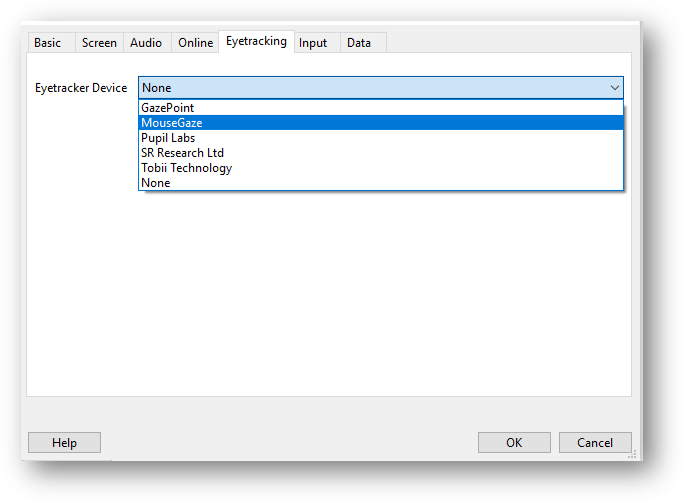
Eyetracking tab. Select "None" when using the psychopy-eyelink plugin.
Online
Psychopy offers the option to auto-translate your python code into JavaScript (or manually add JS), so that the experiment can be run online in combination with Pavlovia. However, you should be aware that not all features are available online, and that bugs still frequently occur. For a running overview of these issues, please consult the developer crib sheet and the forum.
Tips & Tricks
Syncing to Pavlovia from network drives.
Psychopy has the functionality to upload and sync (JavaScript compatible) experiments directly to Pavlovia.org.

Testing shows that this functionality works properly if the project files are located on the local C-drive. However, in some cases it does not work if the if the experiment folder/files are located on the network drive (e.g. in the P-drive). Throwing the following error:

By default, any project located on the P-drive will show the \\VUW\.. path when initially creating the project on Pavlovia from Builder:

There are two workarounds.
Change this default path when first syncing to the shorter P:\ or J:\ notation, e.g.:
\\VUW\Personal$\Homes\O\olferskjf\My Documents\Packaging\Psychopy\Experiments\BART
to
P:\My Documents\Packaging\Psychopy\Experiments\BART
You can do this manually, or by clicking on the "Browse" button and navigating to the desired location.- If the above does not fix the problem, move your experiment folder to the local (C) drive, and open it from there and then sync to Pavlovia.
FAQ
| Topic | Question | Answer |
|---|---|---|
Error when syncing to Pavlovia | when creating a new project on pavlovia from the builder (or syncing to it), an error is thrown ending with "stderr: 'fatal: remote origin already exists". | The workaround is placing your files on the local drive (instead of P or J-drive) or adjusting the default path. See here for further details. |
| Blank screen when running study in local browser | Running a JS study in the local browser, using the button in the builder, only shows an empty screen in the browser. | Make sure adblockers (like Ublock origin) are disabled or set to ignore http://localhost:12002/ |
| 2022.2.2 not syncing to Pavlovia | After installing the 2022.2.2 version, my experiments no longer sync properly to Pavlovia. | In Experiment settings, make sure "Use PsychoPy version" is set to 2022 or 2022.2.2 |
| Any error trying to run a a task with eye tracking | In general, it may be helpful to first start PsychoPy (make sure it is the correct version, see Software list - XWiki), and then open your eye tracking task through File > Open. | |
 | I am trying to run a task with eye tracking, but get an error: AttributeError: 'NoneType' object has no attribute 'isRecordingEnabled' | This error generally occurs when the eye tracker plugin is not installed correctly or when you are using a version of PsychoPy that does not function well with eye tracking. For Tobii, this error has been observed in version 2024.1.5 of PsychoPy. It seems that this version does not work well with Tobii. It is advised to use a different version (contact labbsuport@fsw.leidenuniv.nl). For EyeLink, this error has been observed when trying to run a task that was created with the psychopy-eyelink plugin, but the psychopy-eyetracker-sr-research plugin is also installed and the SR research eye tracker is selected in the Eyetracking properties. A possible solution would be to remove the psychopy-eyetracker-sr-research plugin, restart PsychoPy and make sure the Eyetracker device is set to "None". To remove the plugin, remove the folders that start with psychopy_eyetracker_sr_research in C:\Users\%USERNAME%\AppData\Roaming\ |
 | I am trying to run a task with EyeLink eye tracking, but receive an error: KeyError: 'SR Research Ltd' | This error can also occur when you are trying to run a task that was created with the psychopy-eyelink plugin, but the psychopy-eyetracker-sr-research plugin is also installed and the SR research eye tracker is selected in the Eyetracking properties. See possible solution above. |
 | I am trying to run a task with EyeLink eye tracking, but receive an error: NameError: name 'Initialize' is not defined. | The task crashes on the Initialize component, which is usually the first EyeLink component in the task. At the start of the task, PsychoPy should ask the user to fill in the name of the EDF file (which is the EyeLink data file). When this does not happen, this type of error usually occurs. It seems that communication with the eye tracker is not established through the plugin. The plugin is not installed, or not recognized/interpreted correctly. Make sure the plugin is installed correctly (in C:\Users\%USERNAME%\AppData\Roaming\ |
| AttributeError: 'NoneType' object has no attribute 'getIOHubDeviceClass' | I am trying to run a task with Tobii eye tracking, but receive an error: AttributeError: 'NoneType' object has no attribute 'getIOHubDeviceClass' | This error has been observed in version 2024.1.5 of PsychoPy. It seems that this version does not work well with Tobii. It is advised to use a different version (contact labbsuport@fsw.leidenuniv.nl). |
| PsychoPy does not start. | When starting PsychoPy, the splash screen appears but then goes away and nothing happens. | See Troubleshooting — PsychoPy v2025.2.3, deleting the preferences and app data files (userPrefs.cfg and appData.cfg) should fix the issue. |
Resources
- PsychoPy website
- PsychoPy documentation: Documentation — PsychoPy v2025.1.0